Elevate Your Workflow with TRASHPAD

A DIY, highly-programmable macropad featuring keyswitches, a rotary encoder, and an OLED display. Automate tasks, control media, and boost your daily productivity.

TRASHPAD v1.0
MODE: PRODUCTIVITY
READY VOL: 50%
ENCODER

The Story

How a hackathon project turned into actual hardware.

TRASHPAD started as a hackathon build — the kind of project where the plan is "just get something working" and it somehow turns into designing a custom PCB instead. What was supposed to be a simple macropad ended up with a routed board, a rotary encoder, an OLED display, and a 3D-printed case, because once you're already deep in KiCad at 2am, there's no good reason to stop.

Right now it's in the build-and-test phase — the PCB is designed, the firmware is configured, and the production files are ready to send to a fab. Everything you see in this repo, from the schematic to the case files, is exactly what's getting soldered together right now.
Built for Creators & Coders

Designed with absolute customization and simplicity in mind.

QMK/KMK Firmware

Powered by the best keyboard firmware, enabling fully customized macros, layers, and tap-dances.

🧭

Rotary Encoder

Smooth EC11 rotary encoder perfect for volume control, timeline scrubbing, or brush sizing.

📺

OLED Visual Feedback

0.91" OLED screen shows active profiles, layer indicators, lock statuses, or custom graphics.

⚙️

3D Printable Case

Designed in Fusion 360 with tight tolerances and M3 heatset inserts for absolute durability.

Inside the Build

From schematic to PCB to a model you can actually spin around.

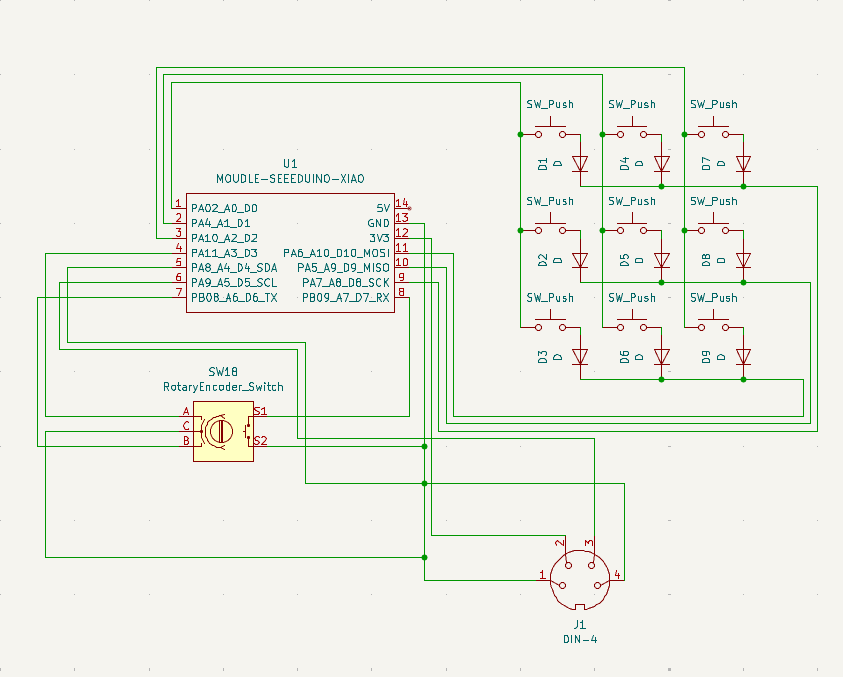
Schematic

TRASHPAD schematic

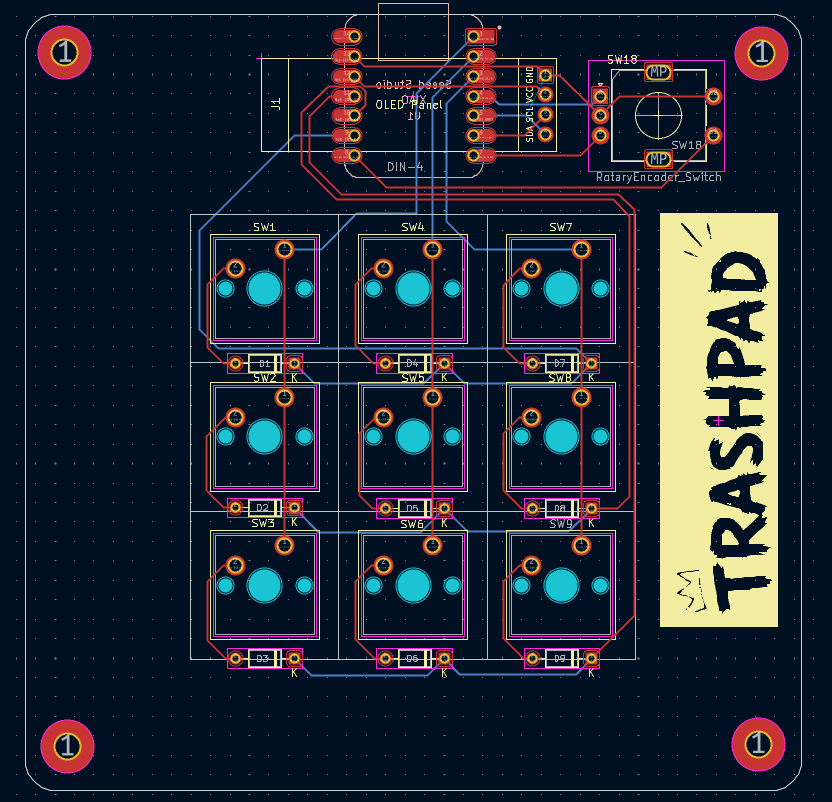
PCB

TRASHPAD PCB

3D Model

drag to rotate · scroll to zoom

Macropad Simulator

Click keys or rotate the wheel to preview the screen feedback.

TRASHPAD SIMULATOR
SYSTEM: OK
VOL / SCRUB

Action Log

> Waiting for input...

Resources & Tips

Everything you need to design, build, and customize your own TRASHPAD.

Useful Hardware Specs

Keep these tolerances in mind during CAD and 3D printing.

Keyswitch Spacing

19.05 mm

Gap between the center of each switch.

Heatset Inserts

Ø 4.7mm × 4.0mm

Hole specs for secure brass thread inserts.

Direct Screws

Ø 2.9 mm

Hole diameter when screwing directly into plastic.

Pass-Through Holes

Ø 3.4 mm

Hole diameter for loose fit M3 screws.

3D Print Gaps

0.2 mm

Ideal spacing tolerance between interfacing 3D parts.

OLED Header

4-Pin Header

Standard footprint connection for screen modules.

💡 Pro Tips:

  • Avoid switch matrix routing if your design has 6 or fewer switches total. Wired directly to individual pins is simpler.
  • Add graphics easily in KiCad by designing overlays in Figma first, then importing them as DXF/SVG.
  • Always run Tools > Cleanup Tracks & Vias in KiCad before finishing, and press the build changes button twice.

Bill of Materials

Everything required to source and build your own TRASHPAD Macropad.

Component Category Description Qty Est. Price
Seeed Studio XIAO RP2040 Logic Dual-core Cortex-M0+ MCU, USB-C connector 1 $5.40
0.91" I2C OLED Display Display SSD1306, 128x32 pixels, 4-pin interface 1 $3.00
EC11 Rotary Encoder Input EC11 encoder with integrated push-switch, 15mm D-shaft 1 $1.50
Cherry MX-Compatible Switches Input MX switches of choice (Gateron, Kailh, Outemu, etc.) 9 $3.50
1u Keycaps Input MX-compatible 1u keycaps of choice 9 $2.00
1N4148 Diodes Logic Switching diodes (SOD-123 surface mount) 9 $0.50
TRASHPAD Custom PCB PCB Custom KiCad PCB fabricated at JLCPCB/PCBWay 1 $2.00
3D Printed Case & Knob Case Top shell, bottom plate, and matching D-shaft knob 1 $2.00
M3 Threaded Inserts Hardware Brass heat-set inserts (Ø 4.7mm x 4.0mm) 4 $0.50
M3 Machine Screws Hardware M3 x 6mm or 8mm button head screws 4 $0.50
Rubber Feet Hardware Self-adhesive silicone bumper pads 4 $0.50
Estimated Build Total 36 ~$21.40